Agent Skills Series (3): How can a small team stand up an AI Skill library in five minutes?
About this series
The first two posts covered why Skills matter and how to write SKILL.md. This one does a single job: how to actually ship Skills to the team. The core tools are skill-base (GitHub · website) and the skb CLI—the goal is to turn “copy-paste the playbook” into a flow that is installable, upgradable, and rollback-friendly.
🤔 Why build this?
Writing a Skill is not the hard part—shipping it to the team and keeping it current is. Once you go live, you usually hit three problems:
- People use different AI tools (Cursor, Claude Code, Qoder, OpenCode, Windsurf, Copilot, etc.): disk paths, load behavior, and default folders all differ. You are not syncing one folder—you are syncing a pile of conventions; if you rely on hand-rolled docs, fragmentation is inevitable.
- Product, design, QA, and ops also need PRDs, test-case templates, checklist-style Skills. If skills live only in a code repo, you lock out non-engineers. The team wants “publish from a browser”, not “learn Git before you get the rules.”
- When you reuse across projects, a “generic auth Skill” polished in project A rarely flows to project B on its own—you still copy-paste, and versions drift for months across repos.
This is less about “how good your prompts are” and more about missing a reliable distribution path.
You can look at the support matrix in vercel-lab/skills—and that list keeps growing as new Agent tools appear:
Expand full Agent and path mapping table
| Agent | --agent | Project Path | Global Path |
|---|---|---|---|
| Amp, Kimi Code CLI, Replit, Universal | amp, kimi-cli, replit, universal | .agents/skills/ | ~/.config/agents/skills/ |
| Antigravity | antigravity | .agents/skills/ | ~/.gemini/antigravity/skills/ |
| Augment | augment | .augment/skills/ | ~/.augment/skills/ |
| IBM Bob | bob | .bob/skills/ | ~/.bob/skills/ |
| Claude Code | claude-code | .claude/skills/ | ~/.claude/skills/ |
| OpenClaw | openclaw | skills/ | ~/.openclaw/skills/ |
| Cline, Warp | cline, warp | .agents/skills/ | ~/.agents/skills/ |
| CodeBuddy | codebuddy | .codebuddy/skills/ | ~/.codebuddy/skills/ |
| Codex | codex | .agents/skills/ | ~/.codex/skills/ |
| Command Code | command-code | .commandcode/skills/ | ~/.commandcode/skills/ |
| Continue | continue | .continue/skills/ | ~/.continue/skills/ |
| Cortex Code | cortex | .cortex/skills/ | ~/.snowflake/cortex/skills/ |
| Crush | crush | .crush/skills/ | ~/.config/crush/skills/ |
| Cursor | cursor | .agents/skills/ | ~/.cursor/skills/ |
| Deep Agents | deepagents | .agents/skills/ | ~/.deepagents/agent/skills/ |
| Droid | droid | .factory/skills/ | ~/.factory/skills/ |
| Firebender | firebender | .agents/skills/ | ~/.firebender/skills/ |
| Gemini CLI | gemini-cli | .agents/skills/ | ~/.gemini/skills/ |
| GitHub Copilot | github-copilot | .agents/skills/ | ~/.copilot/skills/ |
| Goose | goose | .goose/skills/ | ~/.config/goose/skills/ |
| Junie | junie | .junie/skills/ | ~/.junie/skills/ |
| iFlow CLI | iflow-cli | .iflow/skills/ | ~/.iflow/skills/ |
| Kilo Code | kilo | .kilocode/skills/ | ~/.kilocode/skills/ |
| Kiro CLI | kiro-cli | .kiro/skills/ | ~/.kiro/skills/ |
| Kode | kode | .kode/skills/ | ~/.kode/skills/ |
| MCPJam | mcpjam | .mcpjam/skills/ | ~/.mcpjam/skills/ |
| Mistral Vibe | mistral-vibe | .vibe/skills/ | ~/.vibe/skills/ |
| Mux | mux | .mux/skills/ | ~/.mux/skills/ |
| OpenCode | opencode | .agents/skills/ | ~/.config/opencode/skills/ |
| OpenHands | openhands | .openhands/skills/ | ~/.openhands/skills/ |
| Pi | pi | .pi/skills/ | ~/.pi/agent/skills/ |
| Qoder | qoder | .qoder/skills/ | ~/.qoder/skills/ |
| Qwen Code | qwen-code | .qwen/skills/ | ~/.qwen/skills/ |
| Roo Code | roo | .roo/skills/ | ~/.roo/skills/ |
| Trae | trae | .trae/skills/ | ~/.trae/skills/ |
| Trae CN | trae-cn | .trae/skills/ | ~/.trae-cn/skills/ |
| Windsurf | windsurf | .windsurf/skills/ | ~/.codeium/windsurf/skills/ |
| Zencoder | zencoder | .zencoder/skills/ | ~/.zencoder/skills/ |
| Neovate | neovate | .neovate/skills/ | ~/.neovate/skills/ |
| Pochi | pochi | .pochi/skills/ | ~/.pochi/skills/ |
| AdaL | adal | .adal/skills/ | ~/.adal/skills/ |
Skill Base does one thing: solve distribution—it is not another generic file locker.
The data model stays intentionally small: skills.db holds the index and permissions; each version is a zip. Back up by copying the data directory; you can even put that directory under Git.
data/
├── skills.db
└── skills/
    └── <skill-id>/
        ├── v20260406.101500.zip
        └── v20260407.143000.zip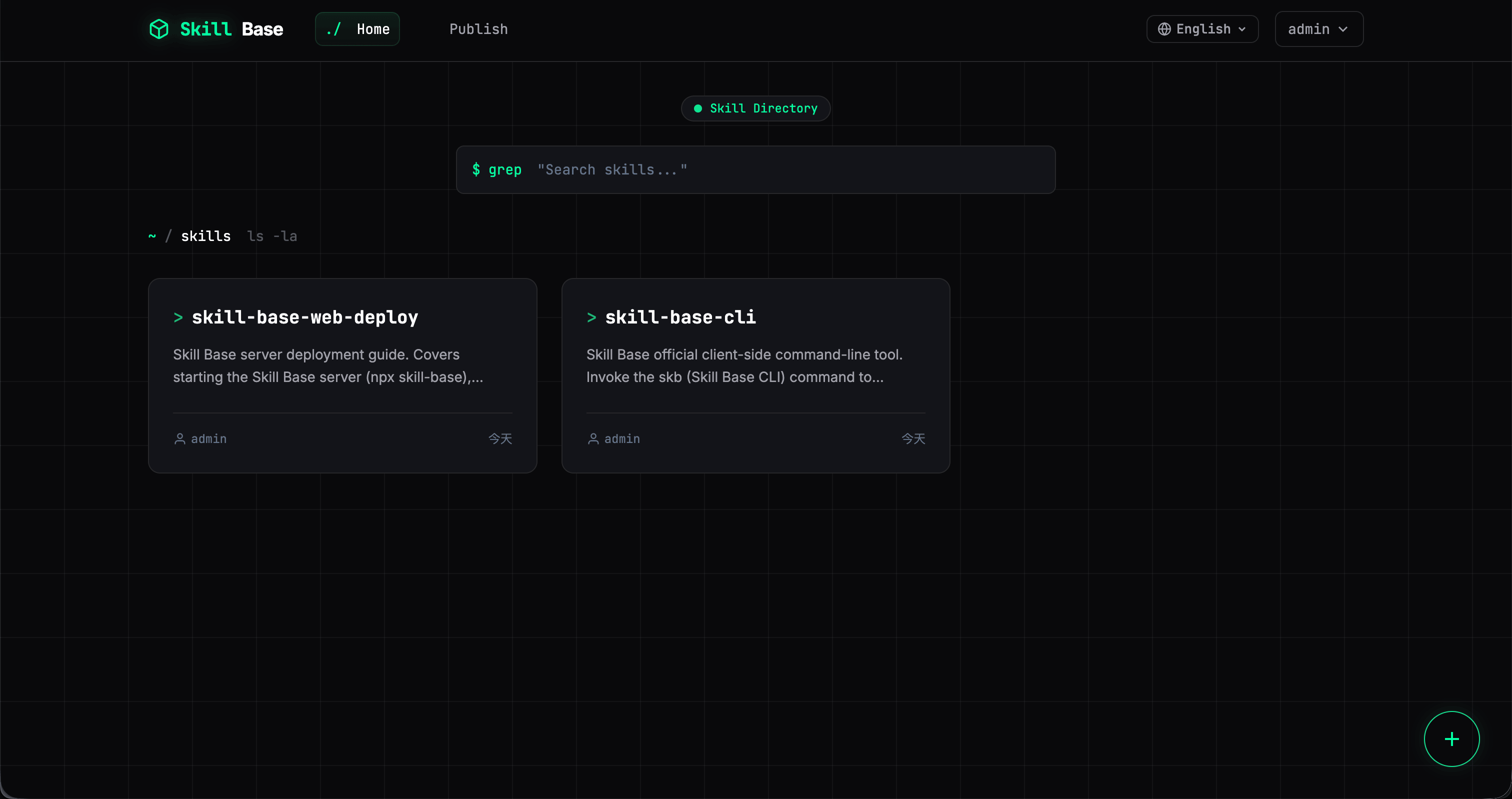
⚡ What does it look like in practice?
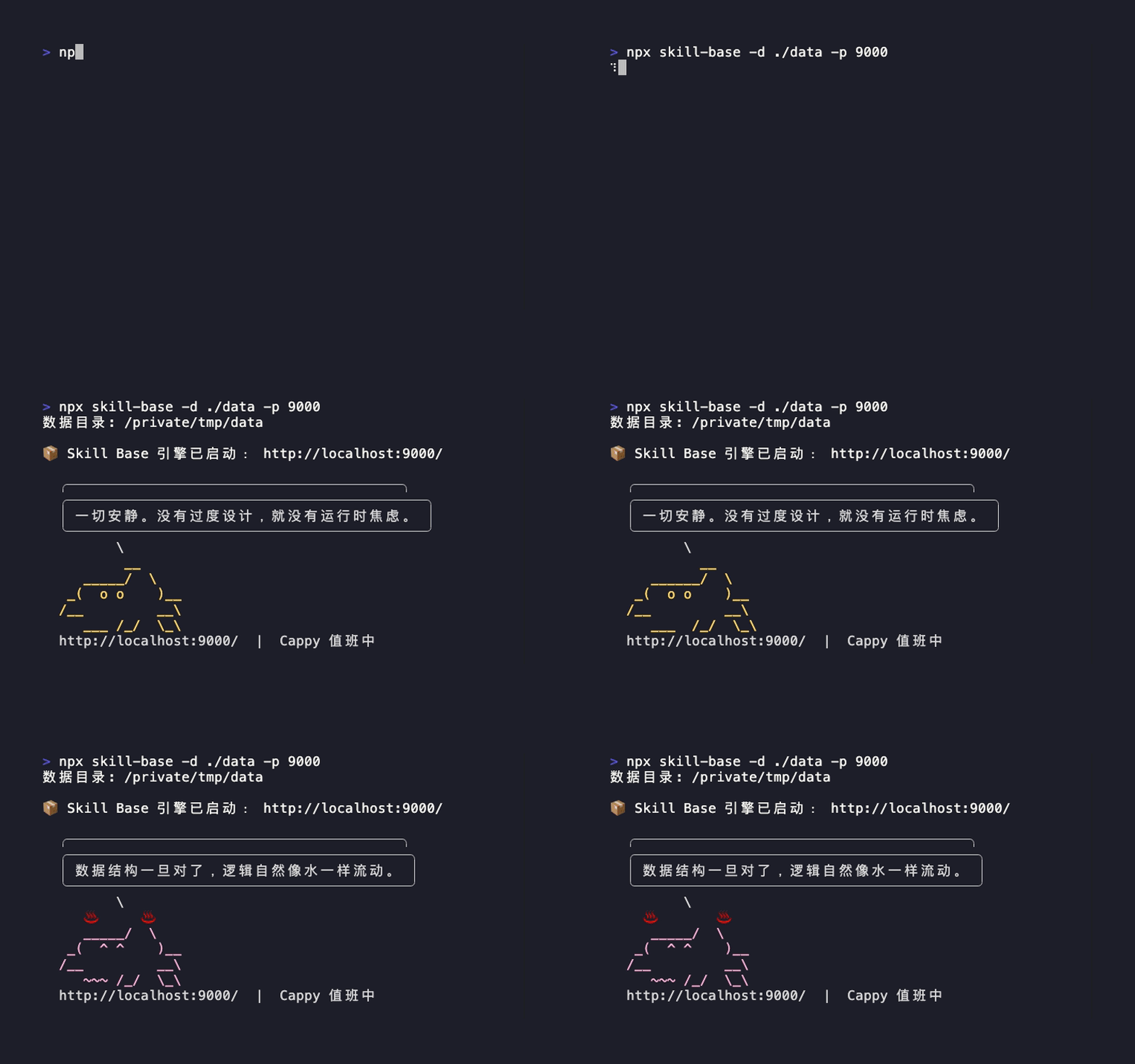
Server: one command to run
npx skill-base -d ./skill-data -p 8000- Node
>= 18 - Uses
node-sqlite3-wasmso day-to-day startup does not depend on compiling native SQLite on the machine - For production,
pm2is a reasonable choice - Docker deployment is supported too
One principle: no MySQL, Redis, or other heavy dependencies—you should not need a full platform just to manage a handful of Skills.
CLI: manage Skills like npm
skb search
skb install
skb update
skb publish
install records which directories were used and which IDE they map to. After the playbook changes, teammates run skb update once to align versions—no more opening dozens of repos to hand-edit stale files.
Install per IDE: no assumption that everyone shares one path
skb install my-skill --ide cursor
skb install my-skill --ide claude-code
skb install my-skill --ide qoder
Skill Base assumes the obvious: people use different IDEs and do not all land in the same folder layout.
Web UI: a workable surface for non-engineers
The web app supports:
- Searching Skills
- Viewing versions and changelogs
- Downloading packages
- Publishing by uploading a folder or zip that contains
SKILL.md
Engineers can stay on the CLI; non-engineers can publish and browse from the browser—that is what closes the loop inside a team.
GitHub import: pull public know-how into a private instance
The publish flow can import from a public GitHub repo by URL or owner/repo; the server fetches the zipball and parses SKILL.md.
That is useful when you want community Skills on a private instance fast, then maintain them to your team’s bar.
✨ How this differs from “yet another Skill site” and clawhub.ai
Whether a tool like this matters is not “can it store files” but whether it closes the distribution loop.
For enterprises, the most valuable asset is internal, private knowledge—content you often cannot upload to a public platform such as clawhub.ai.
One of Skill Base’s biggest traits is fully private deployment: Skills, knowledge, and data stay on your machine or your own servers, so sensitive material is not exposed on the public internet. On public hubs like clawhub.ai, distributing enterprise knowledge inevitably involves uploading to a third party, which carries inherent security and privacy risk. Skill Base lets you run the loop on an internal or dedicated environment: business knowledge and team practice stay under your control.
If you reduce Skill Base to “a file repo with a web UI,” it is easy to conclude “GitHub Releases, clawhub.ai, or a shared drive would do.” That view optimizes for storage and visibility and misses version alignment and update paths in real collaboration, plus strict control of private content that enterprises need.
A direct comparison:
- GitHub Releases / clawhub.ai / shared drives: hosting and public or semi-public distribution (upload, download, search)
- Skill Base: governance for private enterprise distribution—versions, permissions, install records, batch updates, rollback, cross-IDE placement, and air gap between internal sensitive knowledge and the public web
The gap is in data relationships and controllability, not chrome:
- Shared-drive model:
file → download link - clawhub.ai / public Skill hubs:
Skill (often public or shared) → versions - Skill Base private model:
Skill → versions → permissions → install mapping (local paths / IDE) → update actions, all inside your environment
So Skill Base is not “one more repo”—it upgrades team norms and private knowledge from copy everywhere / upload to share to publish, track, update, and fully control.
In one line each:
- Shared drives / public platforms care most: is the file there, can I download it
- clawhub.ai leans toward: public or semi-private skill community, but data sovereignty is not on the enterprise side
- Skill Base cares most: did private rules and knowledge actually land on each machine, can we keep updating, and does the team own the whole path end to end
- Skill Base avoids MySQL/Redis-class dependencies—low deployment bar, can run on an internal network alone
- CLI and web so engineers and non-engineers are both covered
- Versions and permissions stay with the team; data never leaves the private perimeter
- The goal is a distribution path you can upgrade, roll back, and audit—not a pile of features for show
🔥 What you actually gain in collaboration
A smooth loop might look like:
- Install team Skills in vibe-coding or cowork-style Agent tools
- In daily use, when a Skill falls short, have the AI help you edit
SKILL.md skb publishto your internal Skill Base and have the AI draft the changelog- Teammates run
skb updateto align versions
The win: experience does not die in one person’s chat history—it becomes distributable, traceable team property.
🧸 Small easter egg: Cappy in the terminal
The CLI shows an ASCII pet, Cappy, by default—pure stress relief; it does not affect behavior.
If you do not want it, pass --no-cappy on startup.
Try it now
- Website: https://skillbase.reaidea.com/
- GitHub: https://github.com/ginuim/skill-base
# Start the service
npx skill-base -d ./skill-data -p 8000

# Install CLI (repo standard is pnpm)
pnpm add -g skill-base-cli

# Commands
skb --help
Series map (sibling posts)
| Part | Post | What it covers |
|---|---|---|
| 1 | Pain points and motivation | Why Skills |
| 2 | Concepts in practice | SKILL.md structure and progressive disclosure |
| 4 | What deserves a Skill | What to turn into a Skill and where to draw the line |
| 5 | Admin query page case study | A project-level Skill refactor example |
| 6 | Operating playbook | Triggers, conflicts, and version governance |
| Extra | Fragmentation | Trigger governance when many Skills and many tools coexist |
Further reading
- Concepts in practice: get
SKILL.mdstructure right before you worry about distribution. - What deserves a Skill: keep the number of Skills and their scope under control—avoid “everything is a Skill.”
- Fragmentation: when Skills multiply, handle same names, conflicts, and trigger drift.
- Anthropic: Agent Skills overview: treat official docs as the source of truth for fields and runtime behavior.